Microsoft 365 outage card: one page for when Outlook and Teams are down
A one-page fallback card for small teams on Microsoft 365: who to phone, where to talk, this week's files offline, and what each AI assistant can still do when Outlook and Teams are down.
A Microsoft 365 outage card is one sheet of paper that holds what you need when Outlook, Teams and Copilot won't open: phone numbers, a second place to talk, who makes the call, where this week's files are kept offline, and what each AI assistant can still do. Fill it in while everything works and keep it somewhere Microsoft 365 can't take down.
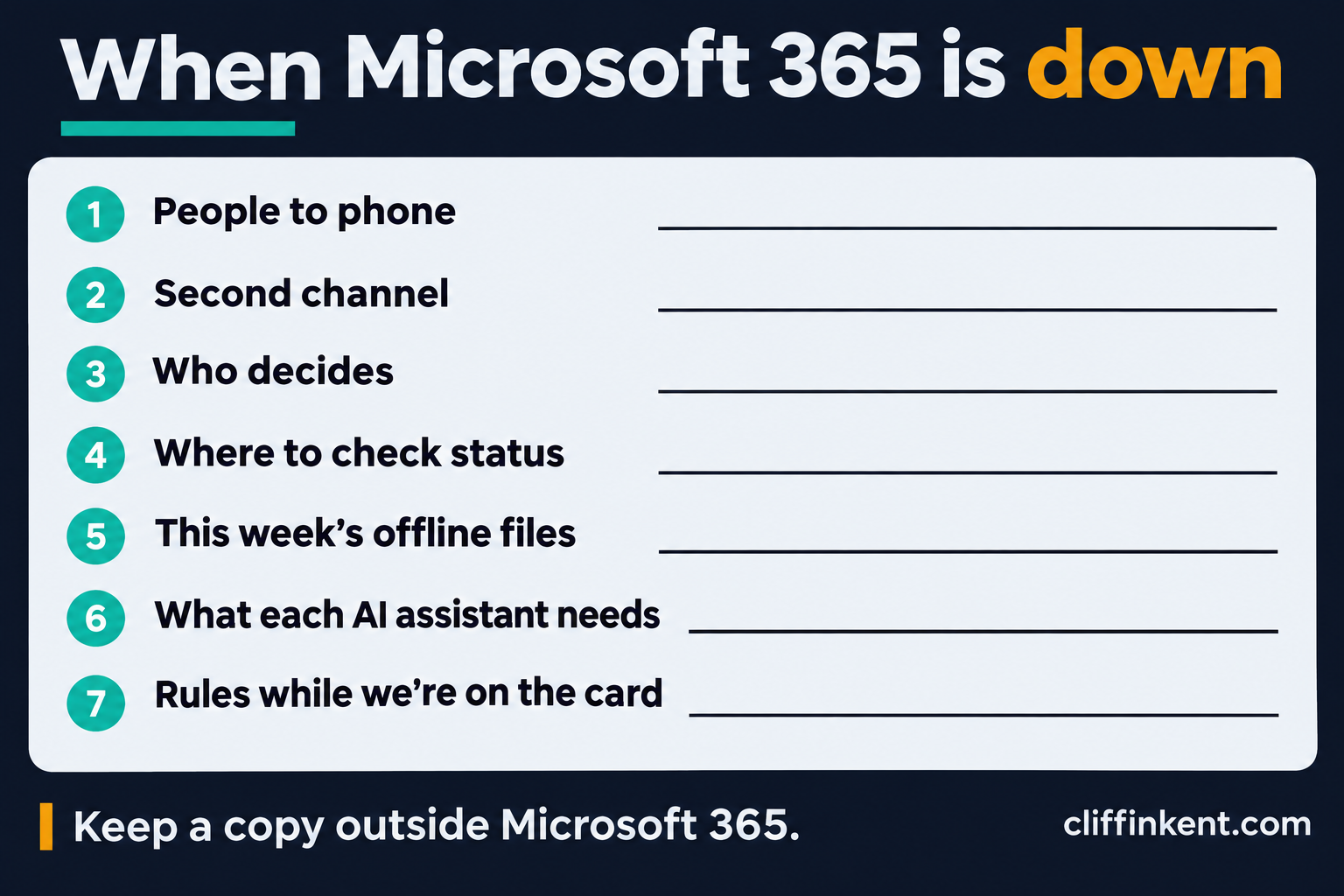
I wrote this on Friday 13 November 2026, during the Exchange Online outage that began the afternoon before. At 09:14 GMT I couldn't get into Outlook, Teams or Copilot, while the latest report of Microsoft's position, at 07:25 GMT, was that joining Teams calls and meetings still worked. The Riverside example below is made up.
Who is the card for?
Teams of roughly two to twenty people who run their day through Microsoft 365 and have no IT department writing a continuity plan for them. A larger organisation should already have a proper plan, and this card doesn't replace one.
What goes wrong without one?
The contact list is in Outlook and the team chat is in Teams. The client's number is in an email you can't open, and the file you need is in SharePoint. During this outage the Microsoft 365 admin centre was among the affected services, and Microsoft pointed people to status.cloud.microsoft instead, so the page that tells you what's broken can be out of reach too.
AI assistants go the same way. UC Today reported that Microsoft 365 Copilot chat might not load or reach email, calendar and files, that Anthropic had mail, calendar and search failing for most requests in Claude's Microsoft 365 connector, and that OpenAI warned ChatGPT's Microsoft 365 connections might not work as expected. A second assistant is no backup when it reads the same mailbox.
The card
Start with a top line: the date you filled it in, where the paper copy is kept, and whose phones hold a photo of it. Then seven sections.
1. People to phone. Include the team, the clients or suppliers you'd need on a bad day, and whoever supports your IT. For each, write the name, role, mobile number and when to phone them.
2. Second channel. Where you talk when Teams and Outlook are down. It must not sign in with a Microsoft 365 account. Note who is in it and the date you last tested it.
3. Who decides. Name who says "we're on the card", and who tells clients and by what route.
4. Where to check status. Write down status.cloud.microsoft and @MSFT365Status on X, then add your own test: open Outlook, Teams and one shared file. If they fail, you're on the card, whatever the status page says.
5. This week's files. List each file you'd need, why you'd need it, where the offline copy is and the date you copied it.
6. What your AI assistants need. For each assistant, write what it has to reach and what still works with Microsoft 365 down.
7. Rules while you're on the card. Work and client data stays out of personal email and personal AI accounts. Take extra care with links in email. Email may arrive late, so phone to confirm anything urgent.
That's the whole card, and you can copy it from here. Newsletter subscribers also get a fill-in version in Notion to duplicate and print, and the prompt that checks a finished card.
How do you fill it in?
You don't need AI for this. A pen will do, and the phone numbers should go in by hand so they never pass through a chat window.
Print the card and ask everyone to photograph it. A copy saved only in SharePoint or OneDrive is out of reach in the outage it was written for.
Example: a five-person consultancy
Riverside Planning is a made-up five-person consultancy on Microsoft 365 with Copilot. Two of the team also use Claude with its Microsoft 365 connector.
Their second channel is a WhatsApp group, tested on the first Monday of each month. Priya, the office manager, decides when they're on the card and phones the three clients with work due that week. The files section lists the two proposals due on Friday, each copied to a laptop's local Documents folder on Monday.
Their assistants section has two rows. Copilot has to reach the mailbox, calendar, SharePoint and OneDrive, so they mark it as down with Microsoft 365. Claude can still answer questions and work on files they upload, but its Microsoft 365 connector reads the same mailbox, so they mark inbox, calendar and search as down too.
What won't the card do?
It won't bring email back or tell you when Microsoft will. It also won't make a workaround safe. Moving client work into a personal email or a personal AI account during an outage puts that data somewhere your employer or client hasn't approved; Keep work out of your personal Copilot account covers why. ITdaily reported that Safe Links in Defender for Office 365 might be unable to check URLs during this outage, which is why the card says to take extra care with links.
The card goes stale. Phone numbers change and people leave, so date it and check it whenever someone joins or goes.
Sources
- Microsoft 365 Outage: Outlook Down, and the Fix Won't Hold, UC Today, updated 07:25 GMT on 13 November 2026, checked 13 November 2026.
- Microsoft 365 still offline: Outlook and Teams disrupted, ITdaily, checked 13 November 2026.
- Microsoft 365 Status on X, incident updates for EX1550543 and MO1550821, checked 13 November 2026.
Subscribers get the template
Enter the email you use for the Cliffinkent newsletter. If it is confirmed, the worksheet opens here.
No account. No download portal. Just a subscriber check.